
This laptop is on the way from our supplier. We'll dispatch it as soon as it arrives with us, usually within 2–4 working days.
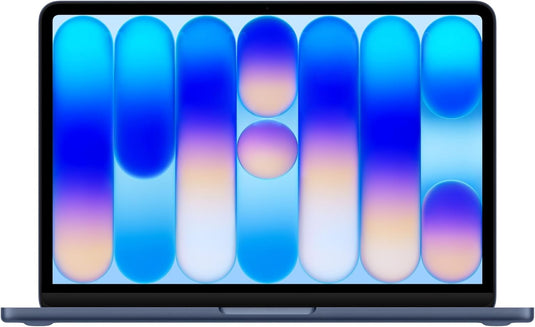
Apple Laptop MacBook Neo
18 Pro Chip 8GB RAM 256GB SSD 2026 Model 13" Liquid Retina Screen
Ow, you’ve missed a great deal
This laptop has now sold, but other options are available.
£559.00
Out of stock
This item is currently unavailable.
Pay Monthly Laptop Options
Pay from £46.58 per month
6-24 months. Rep. 36.8% APR. 3 instalments of £186.33
0% interest with Klarna
6-24 months. Rep. 36.8% APR. 3 instalments of £186.33
0% interest with Klarna
Choose finance, or to pay by credit or debit card at checkout. We accept Apple Pay, Google Pay and Amercian Express too.
Joey, Tech Expert @ Laptop Station
“At £559, this Apple laptop is priced fairly for its capability. Laptops around this price typically score between 19 and 22.”
20/30
My score
Great for
Popular gaming apps like Minecraft and Sims 4
The kids to play Roblox or simple flash games
Basic photo editing on apps like Canva or GIMP
Also good for
Video and voice calls on Teams and WhatsApp
Watching TV or movies on YouTube, Netflix or iPlayer
Checking your emails and using Outlook
Not ideal if you need
Professional editing using DaVinci, SolidWorks, Sketchup
Advanced gaming for Cyberpunk or Marvel Rivals
Action games like GTA V and Fortnite
Similar laptops worth comparing
Displaying laptops within £50 of your budget with similar scores so you can compare.
Laptop FAQs
We've answered the common questions we're asked about this laptop.
Yes. You can choose to pay for your laptop monthly up to 24 months with our finance partner, Payl8r. Simply choose the Payl8r option at checkout. You can pay an optional deposit, and choose how many months.
Here’s how it looks:
| Over 24 months | from £23.29 |
| Over 18 months | from £31.05 |
| Over 12 months | from £46.58 |
The rate provided to you is subject to credit. Over 18s only.
Representative example: If you borrow £510.00 over 12 months at a fixed monthly interest rate of 2.50% and an annual rate of 30.00% and a representative APR of 65.5%, you will pay: Monthly payment: £55.25. Total repayments: £663.00. Total charge for credit: £153.00.
We have Klarna too. Pay in 3 payments of £186.33 with no interest. Choose Klarna at checkout.
No, this laptop runs Apple’s Mac OS.
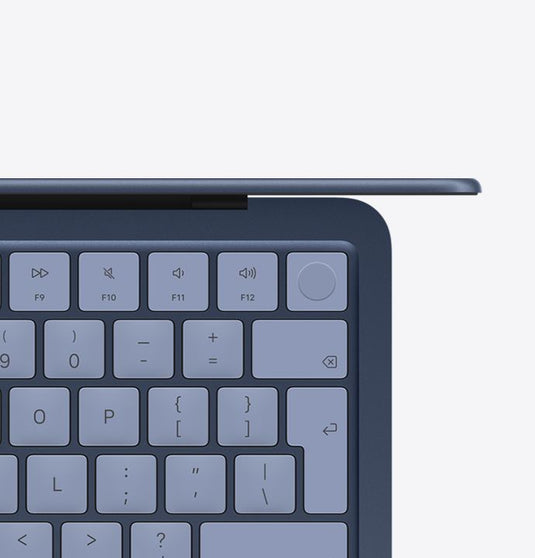
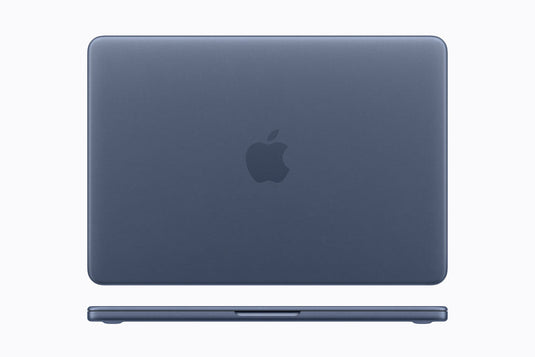
The colour of this Apple laptop is Blue.
Yes, this laptop has a USB C port that allows you to connect an external monitor. If you’re connecting to an existing screen, check it has a USB C display port, USB4, or HDMI port.
The model number for this Apple laptop is 195950852998.
There is a one year warranty on all laptops, with an option to extend to two years for a small charge.
.
Buy with confidence
Thoroughly checked
Each laptop is checked by our technicians and is backed by a one year warranty.
21 point check
Each laptop receives a comprehensive check of all its components, moving bits, and internals to make sure they're all tip-top.
1.System & BIOS check
2.Processor performance check
3.Memory RAM test
4.Storage health check
5.Battery health check
6.Display quality check
7.Keyboard test
8.Trackpad test
9.Ports & connections
10.Wi-Fi & Bluetooth
11.Audio speakers & mic
12.Camera test
13.Cooling system check
14.Fan noise check
15.Graphics performance
16.Shake test
17.Photos taken
18.Build & hinge check
19.Exterior condition
20.Clean & dust removal
21.Final ready-to-use check
The geeky bit
Performance and technical information
A clear breakdown of the main spec, screen, ports and everyday features.
- Processor
- A18 Pro 6-Core CPU / 5-Core GPU
- RAM
- 8GB
- Storage
- 256GB SSD
- Graphics
- Integrated Apple Graphics
- Operating System
- Mac OS installed
- Screen Size
- 13"
- Resolution
- (2048x1506p)
- Screen Features
- Liquid Retina
- IPS
- Ports
- USB-C (Display Port)
- 1xUSB Type-C
- Networking
- WiFi 6E
- Bluetooth
- Colour
- Blue
- Product Weight
- 1.23 kg
- Release Year
- Early 2026
- Model No.
- 195950852998
- Other Features
- Webcam
- Fingerprint Reader
- Lightweight (Under 1.6KG)
About Apple Laptop MacBook Neo - 18 Pro Chip 8GB RAM 256GB SSD 2026 Model 13" Liquid Retina Screen
Apple MacBook Neo gives you incredible power and portability. Its fast A18 Pro chip is built for AI and keeps everything sharp and snappy. Apps launch quickly and everyday tasks feel effortless.
The stunning 13” Liquid Retina display brings everything to life with sharp detail and vibrant, true-to-life colour.
Key Features
- With brilliant colours and upto 500 nits brightness, the display is amazing to use.
- macOS runs apps fast, including built-in apps like FaceTime and Messages.
- Housed in a gorgeous blue colouring, this is the most colourful MacBook ever!
- It's lightweight, only 1.23KG, making it the perfect travel companion.
- Protect your data with the built-in fingerprint sensor.
Only one available!
About the VAT Margin Scheme (VMS)
The VAT Margin Scheme allows selected used laptops and electronics to be sold without charging standard 20% VAT.
For home users: Great news, you won't pay any VAT on this item. The price shown already reflects the total you'll pay, you don't need to do anything.
For VAT registered businesses: You're still getting a cracking deal, however, this laptop won't be supplied with a VAT invoice as there is none to reclaim. You'll still get a receipt.
Images are for illustrative purposes only.
Laptops you've looked at
How suitable is this laptop for your software?
Ratings based on this laptop’s specifications and our software requirements.
Adobe After Effects
Not compatibleThis laptop does not meet our compatibility criteria for this app.
Adobe Illustrator
Not compatibleThis laptop does not meet our compatibility criteria for this app.
Adobe InDesign
Basic · 1/4Best for: Can work on simple flyers, business cards & short text-led documents with a few placed images. Whilke text styles, page numbering & PDF exports are usable you should not expect fast performance on image-heavy layouts.
Adobe Lightroom (Classic)
Basic · 1/4Best for: Can perform occasional importing, rating, cropping & exposure or colour adjustments. Keep other apps open to a minimum, especially when trying to work on individual RAW edits.
Adobe Photoshop
Basic · 1/4Best for: Realistic tasks you can do include cropping, exposure adjustments, resizing and simple photo repairs. Can also do small compositions with text, adjustment layers and basic masks.
Adobe Photoshop Elements
Basic · 1/4Best for: Can do occasional cropping, exposure correction, red-eye removal & simple photo repairs. Small Guided Edits, text additions & straightforward layered designs are doable.
Adobe Premiere Elements
Basic · 1/4Best for: Good for short HD videos assembled with cuts, simple titles & music. Basic colour adjustments & a small number of transitions can also be done.
Adobe Premiere Pro
Not compatibleThis laptop does not meet our compatibility criteria for this app.
Affinity Photo
Good · 2/4Best for: Meets minimum requirements for everyday RAW adjustments, portrait retouching & modest photo composites. Layers, masks & a limited number of Llve filters are some of the tools usable.
Canva
Very Good · 3/4Best for: Canva is a cloud-based editor meaning you can work on larger presentations, detailed marketing designs & editing while other office apps are open on laptops in this tier.
CapCut
Basic · 1/4Best for: Good for making short clips with cuts, text, music & a few transitions, plus simple social videos & light adjustments.
CyberLink PowerDirector 365
Basic · 1/4Best for: Good optoins for short HD videos with cuts, basic titles, transitions & music. Will need to keep the number of overlays & effects small & use a lower preview quality when required.
DaVinci Resolve Studio
Not compatibleThis laptop does not meet our compatibility criteria for this app.
GIMP
Good · 2/4Best for: Meets minimum requirements for regular photo correction, clone & heal retouching, & modest layered compositions. Masks, text & editable filters can be used with more room than the Basic tier.
Serato DJ Pro
Good · 2/4Best for: Doing basic track analysis, 2-deck mixing, plus simple looping and cue points.
Football Manager 26
Basic · 1/4Best for: Simming matches, with small player and league databases. Some lag can be expected in menus.
Fortnite
Not compatibleThis laptop does not meet our compatibility criteria for this app.
Hogwarts Legacy
Not compatibleThis laptop does not meet our compatibility criteria for this app.
Minecraft Java Edition
Not compatibleThis laptop does not meet our compatibility criteria for this app.
Microsoft Word, Excel or Google Docs
Very Good · 3/4Best for: Working on slightly larger Word, Excel and Powerpoint documents.
Kids Schoolwork
Very Good · 3/4Best for: Kids at High School. A good choice for non-app specific work including projects, online research and eLearning.